Monday, February 23, 2015

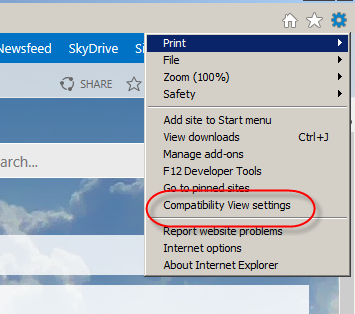
Edit Page is not working in Internet Explorer

Introduction

 Edit Page of SharePoint is not working with Internet Explorer. This is one of the known issue. To resolve this, do following steps

Goto Settings >> Compatibility  View Settings


Give the SharePoint Site URL there


Wednesday, December 3, 2014

Uninstall the WSP solution from SharePoint farm using Poweshell

Introduction

Normally, we are uninstall and remove the wsp from farm manually. Here i am sharing powershell script for this


$SPfarm = [Microsoft.SharePoint.Administration.SPFarm]::get_Local()


$solution = "SolutionName.wsp";
#Getting solution id
$currentSolution = $SPfarm.get_Solutions() | Where-Object { $_.DisplayName -eq $solution; }
$sol_file = $currentSolution.id

$spSolution = GET-SPSolution -Identity $sol_file
if ($spSolution.ContainsWebApplicationResource)
{
    $spSolution | UnInstall-SPSolution -AllWebApplications -Confirm:$false
}
else
{
    $spSolution | UnInstall-SPSolution -Confirm:$false
}

do { Start-Sleep -Seconds 1; Write-Host "Waiting for undeployment..." } while ($spSolution.DeploymentState -ne [Microsoft.SharePoint.Administration.SPSolutionDeploymentState]::NotDeployed)

Write-Host "Waiting for timer job to complete. " -ForegroundColor Yellow
Start-Sleep -Seconds 30

# Remove solution from solution store
Remove-SPSolution –Identity $sol_file -confirm: $false

Write-Host "Solution undeployed!" -ForegroundColor Green

Tuesday, December 2, 2014

Retrieve details of solution using powershell script

Introduction

Here i am going to share the script for show the details of solution which is deployed in the farm

$SPfarm = [Microsoft.SharePoint.Administration.SPFarm]::get_Local()

# What Solution are we looking for?
$solution = "Solutionname.wsp";

# Get the solutions
$currentSolution = $SPfarm.get_Solutions() | Where-Object { $_.DisplayName -eq $solution; }
$currentSolution;

Adding “Everyone” Permissions Programmatically in SharePoint 2013

Introduction

Normally, we are having permission level operations in SharePoint. We may assign such kind of permission both manually and programmatically. Here, we will see how to give permission to "Everyone" programmatically

Code


SPUser allUsers = web.AllUsers[@”c:0(.s|true”]; //c:0(.s|true is Everyone
SPRoleDefinitionCollection roleCollection = web.RoleDefinitions;
SPRoleDefinition roleDefinition = roleCollection[“Visitors”];

SPRoleAssignment roleAssignment = newSPRoleAssignment((SPPrincipal)allUsers);
roleAssignment.RoleDefinitionBindings.Add(roleDefinition);

list.BreakRoleInheritance(false);
list.RoleAssignments.Add(roleAssignment);

list.Update();

Powershell script

Set-SPUser -Identity "c:o(.s\true" -web "webUrl" -Group "Visitors"

Wednesday, November 26, 2014

Delete webparts from Webpart Gallery

Introduction

We may came across the situation to remove all the custom webparts while feature deactivating. Here we are going to see how to remove the webparts programmatically.

Code

Paste the below code in FeatureDeactivating method

  SPSite site = properties.Feature.Parent as SPSite;
            if (site != null)
            {
                var definedElements = properties.Definition.GetElementDefinitions(CultureInfo.InvariantCulture);
                var allFiles = definedElements.Cast<SPElementDefinition>()
                    .SelectMany(x => x.XmlDefinition.ChildNodes.Cast<XmlElement>()
                        .Where(f => f.Name.Equals("File"))
                        .Select(f => f.Attributes["Url"].Value)).ToList();
                var webPartGallery = site.RootWeb.Lists["Webpart Gallery Name"];

                var webPartsToDelete = webPartGallery.Items.Cast<SPListItem>()
                    .Where(w => allFiles.Contains(w.File.Name)).ToList();

                for (var index = webPartsToDelete.Count - 1; index >= 0; --index)
                {
                    var webPartItem = webPartsToDelete[index];
                    webPartItem.Delete();
                }
            }

Tuesday, November 25, 2014

Delete folder from Catalog masterpage

Introduction

We may came across this situation to delete a folder in catalog master page when you deactivating feature. Here we are going to see, how can we delete this kind of folder programmatically
Code

using (SPSite site = new SPSite(siteUrl))
{
 SPList listCatalog = site.GetCatalog(SPListTemplateType.MasterPageCatalog);
                site.AllowUnsafeUpdates = true;
                SPFolder masterpageFolder = listCatalog.RootFolder.SubFolders["FolderName"];
                if (masterpageFolder != null)
                {
                    masterpageFolder.Delete();
                }
                site.AllowUnsafeUpdates = false;
                site.RootWeb.Update();
}

Friday, November 14, 2014

Join This Community Button Not visible on Community Site


In some case we may faced this issue in community site. To enable this button select "Enable Auto-Approval" in Community Settings. 

Note: This option available when Community site is in root site. This Feature will applicable for subsites of Community root site.